Wallpapers
Some cool wallpapers for you to use!





How To Use
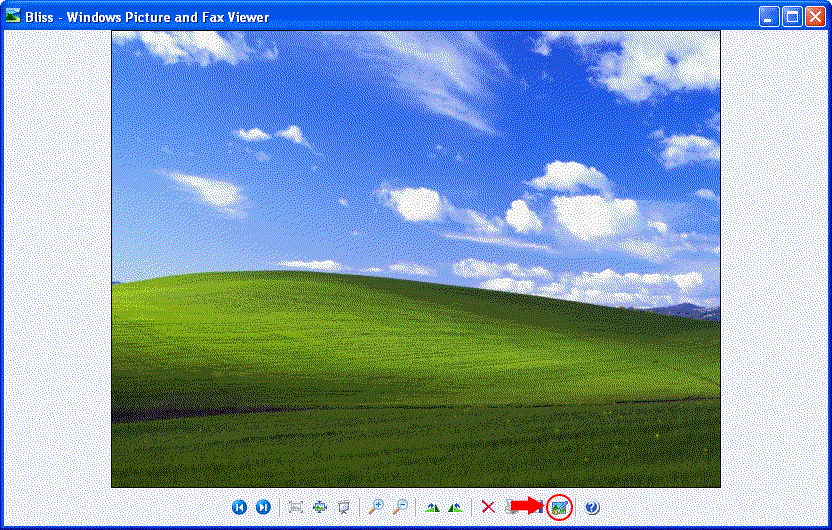
To easily set the image as your wallpaper using Windows Picture and Fax Viewer, Look at the bottom toolbar and look for a small desktop screen with a brush, then click on it!
Alternatively, you can locate your downloaded wallpaper, right-click on the wallpaper then left-click Set as Desktop Wallpaper from the context menu.
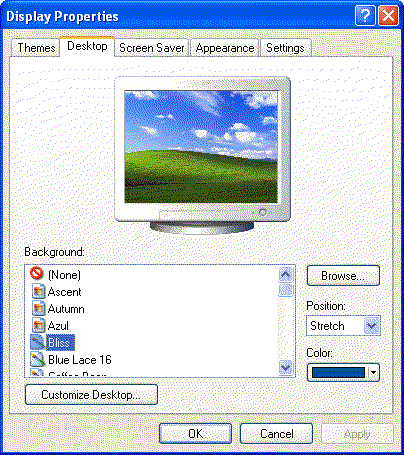
Or you can use the Display Properties by Right-clicking on the empty space on your Desktop and left-clicking on the Properties option. Then, click on the Desktop tab, Click browse and look for your brand-new wallpaper.
With the display properties, you can choose some options from the Position menu! You can stretch, center or tile your wallpaper!
(Note that some image files might not work based on the compatibility.)